
The workflow canvas
Last updated on
A strip across the top shows the four stages in the order they really run, each with a count and a warning if it's empty in a way that breaks things:
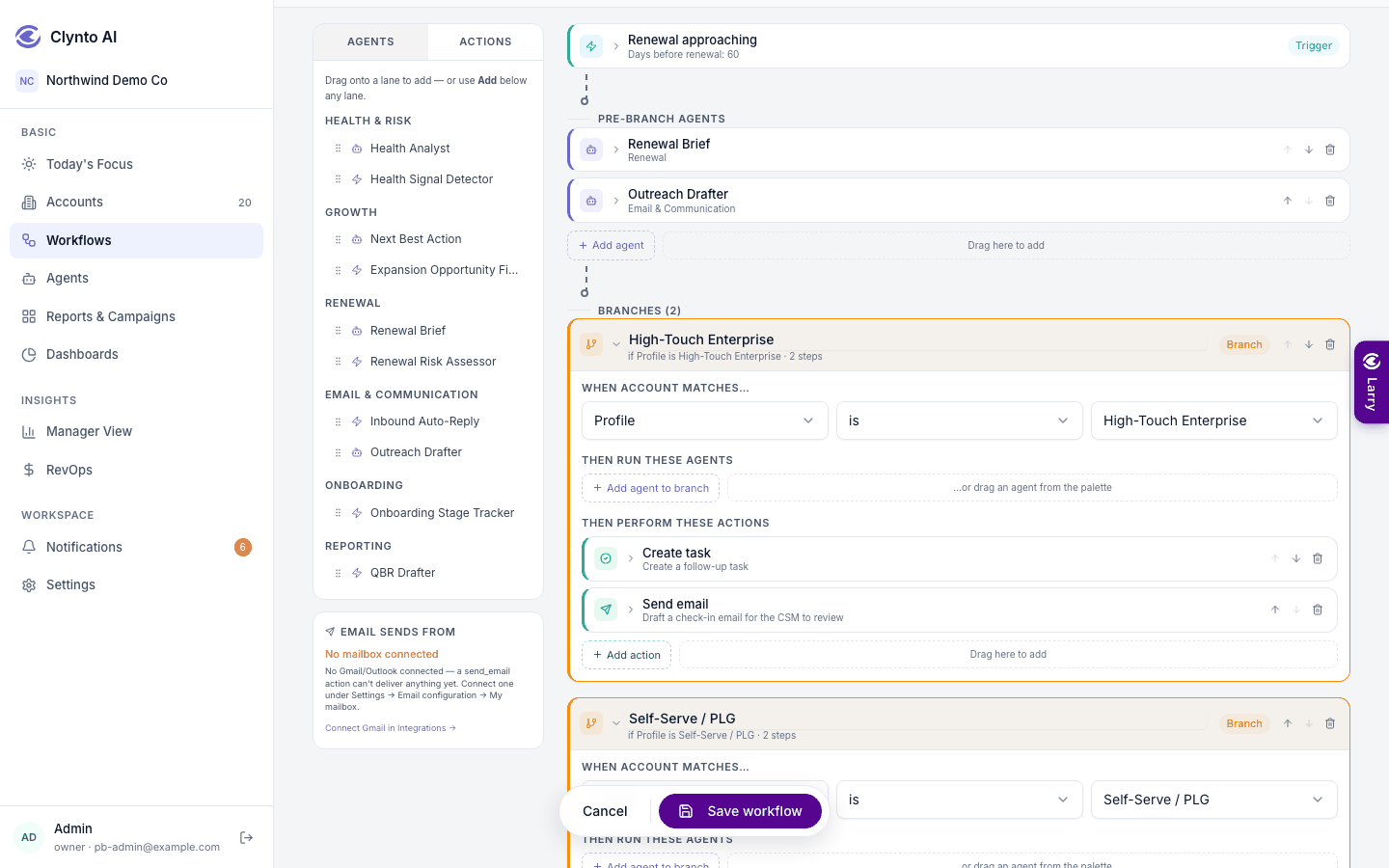
1 Choose a trigger → 2 Pre-branch agents → 3 Branches → 4 Actions
- Name — required before you can save.
- Trigger — When something happens (an event grouped by area, each with its own settings) or On a schedule (see "Scheduled workflows").
- Pre-branch agents — run for every matched account, in order, before any branching.
- Branches — optional; each has a condition (for example Profile is High-Touch Enterprise) and its own agents and actions. Every matching branch runs.
- Post-branch actions — run after the branches.
Add steps by dragging from the palette, with Add agent / Add action under a lane, or reorder with the handles (arrow buttons work from the keyboard). The agent picker includes your custom agents and ends with Create a new agent…, which opens the form right on the canvas.
Every action is prefilled with the account, the CSM and a title and body from the matched account; you only fill in what's specific.
Creating a workflow
Create workflow on the Workflows page opens a blank canvas with a Generate with AI panel on top: "What workflow do you want to create today?"
Triggers
Onboarding stalled, Champion gone quiet and Seat utilisation scan are agent-led: they hand every active account to their paired agent (Onboarding Stage Tracker,…