
The Approvals queue
Last updated on
Everything from a workflow step set to Needs approval (and High-Touch Task Closer closures) waits here, in the Approvals tab under Notifications (also at /approvals). Today's Focus shows the ones waiting on you.
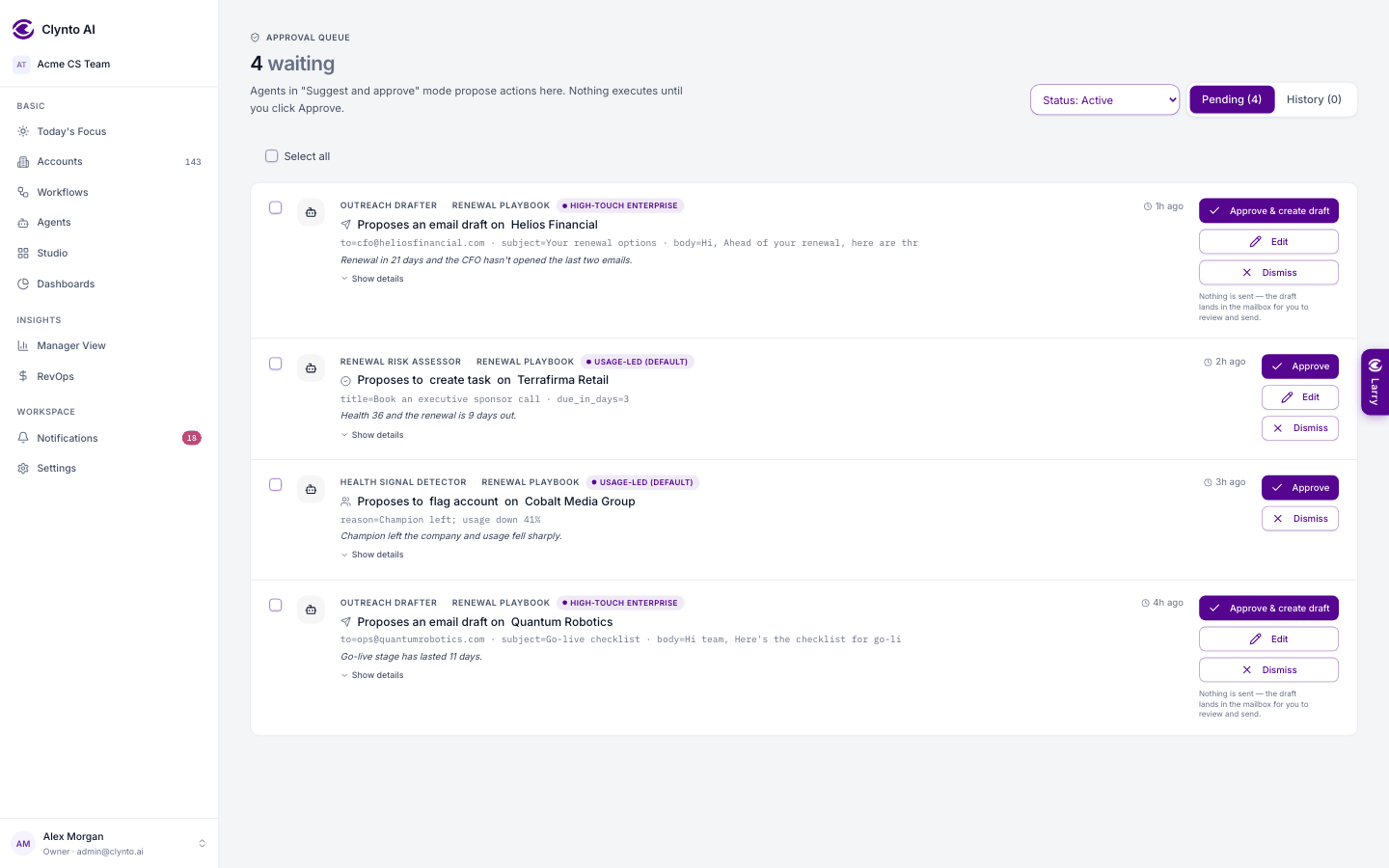
Each row shows the agent, the account, the action and the estimated minutes saved. Click a row to see everything: the full email for a send, the reasoning for a workflow step, the prefilled title and due date for a task.
- Edit (on emails, tasks, notifications and signals) lets you change it first, then Approve with edits.
- Approve runs it now — for an email, Approve & create draft puts the draft in the mailbox.
- Dismiss discards it. Half credit is still given, because a person made the decision.
- Tick several rows to Approve selected or Dismiss selected.
- The History tab lists past decisions.
- After an edit or a dismiss you can tap an optional reason — Wrong recipient, Tone, Inaccurate, Not needed now, Duplicate, Other. Agents learn from your approvals, edits and reasons.
Tip
Once you decide, it stays decided. Workflows re-check their triggers every 15 minutes, but Clynto remembers your decision and won't re-propose the same account + workflow + action while the same trigger would keep matching. A genuinely new reason — a new email, a new signal — gets its own row.