
Members and roles
Last updated on
Settings → Organization → Members. Roles, from most to least access:
| Role | In short |
|---|---|
| Owner | Everything a Manager can do, plus deactivating, reactivating or deleting the organization and handing over ownership. Exactly one per workspace. |
| Manager | Full access: every account, integrations, health rules and profiles, members, permissions, billing, audit log, Recently deleted, approvals. Sends email on any account. |
| CSM | Only the accounts assigned to them: their tasks, notes, contacts, drafts and email. |
| View only | Read-only. |
There is no Admin role any more: Admins became Managers automatically, with the same permissions. Pick Manager, CSM or View only when adding someone, changing a role, or approving a join request.
Several CSMs on one account
An account can have a primary CSM plus co-CSMs; all of them see and work the account. Set them from the account header (CSM · edit: tick the people, star the primary) or in bulk on the Accounts table (Replace CSM / Add a CSM). In a CSV import, put several emails in the CSM email cell, separated by commas or semicolons — the first is the primary. Automatic emails go out from the primary CSM's mailbox and automatic tasks go to the primary; signal alerts from workflows go to every CSM on the account.
Who can send email where
The Owner and Managers can send on any account. A CSM sends only on their own accounts; anywhere else Clynto says "Only the account's CSM, a Manager or the Owner can send on this account." Mail always leaves from the sender's own mailbox — without one connected you'll see "Connect your Gmail or Outlook in Settings → My mailbox." A CSM can take a task on their own account; only the Owner or a Manager can hand a task to someone else.
Invite by email; the person stays a pending invite until they set a password. CSV imports with unknown CSM emails create pending invites too.
Invite emails
Everyone added to the workspace gets an email, however they were added — created by the Owner or a Manager (with their sign-in details), invited, approved after asking to join, or created by a CSV import (a one-time link to choose a password). The email is sent in the background, and the Invite email column (Owner and Managers) shows how it went: Sending…, Sent, Failed with the reason in plain words (for example, the sender's domain isn't verified with the email service), or Not sent when email isn't set up on this server. Resend welcome email sends a fresh one-time link to choose a password, valid for 72 hours — the original temporary password is never stored, so it can't be sent again.
Removing a member
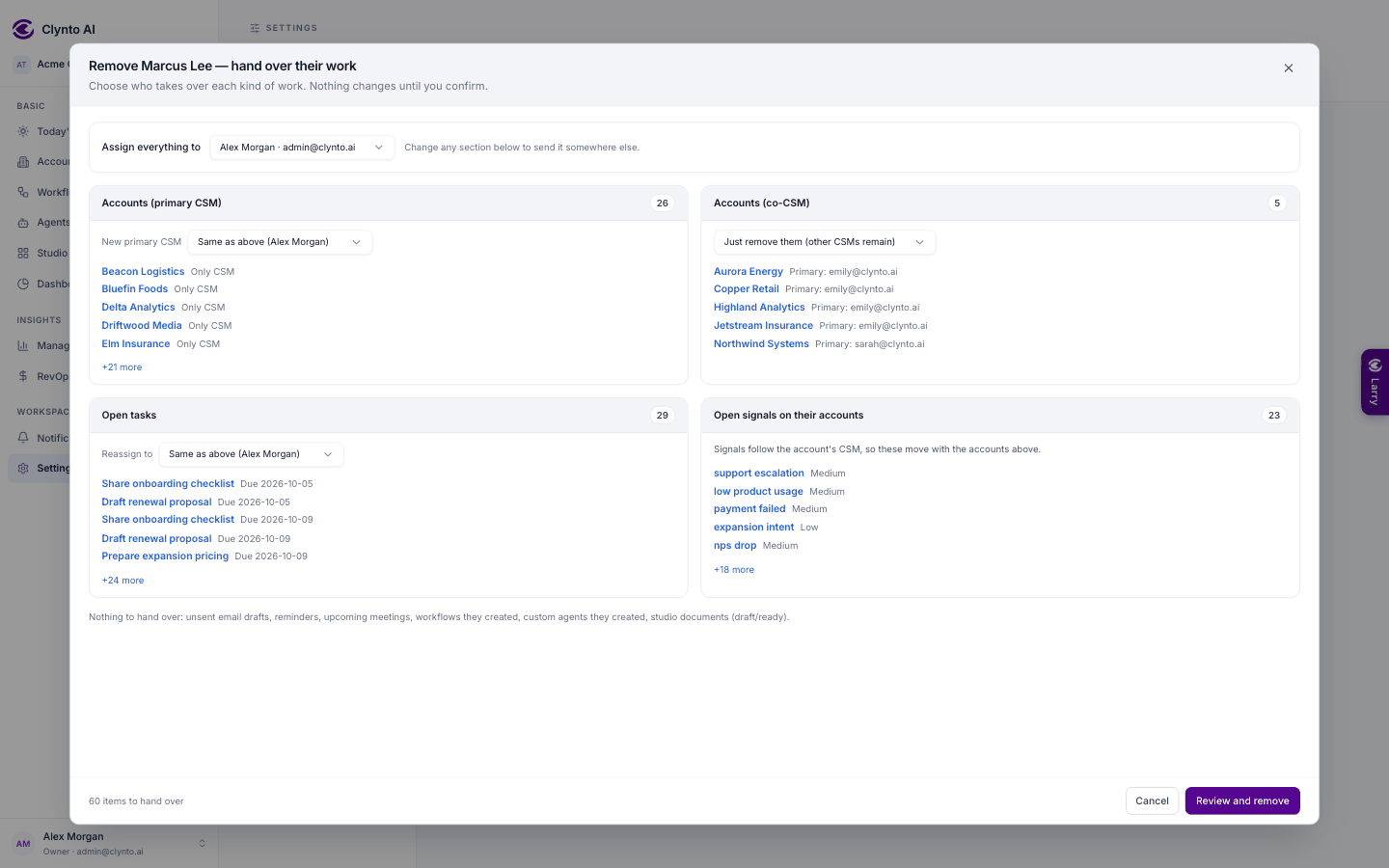
The red bin on a member's row opens Remove Name — hand over their work: one card per kind of work they own — accounts where they are primary CSM, accounts where they are a co-CSM, open tasks, unsent email drafts, reminders, upcoming meetings, workflows and custom agents they created, draft Studio documents — each with a count, the first 5 (click to open) and +N more. Open signals on their accounts are shown too; they follow the account's new CSM. Pick one person under Assign everything to (it starts as you), then change any card if it should go elsewhere. Co-CSM accounts default to Just remove them (other CSMs remain); drafts and reminders can be deleted instead. Their personal mailbox can't be handed over and is disconnected — if it was the campaign mailbox, pick a new one in Integrations.
Review and remove shows what will happen in plain sentences ("Moving 42 accounts and 17 open tasks to Priya…") and that they lose access immediately. Each account's History records the change, and everyone who received work gets one notification. More than 1,000 items run in the background with a progress bar. Someone who owns nothing goes straight to the confirm. You can't remove yourself or the Owner. Larry can do it too, with everything going to one person.
Handing over ownership
Only the Owner can start it, from their own row. The chosen member gets an email invitation (valid 7 days); nothing changes until they accept while signed in as themselves. Then they become Owner and the previous Owner becomes a Manager. A banner shows the pending invitation with Cancel.