
Talking to Larry
Last updated on
Open Larry from the narrow Larry tab on the right edge of any page. Larry opens as a floating pop-up that springs out of the tab, joined to it by a flowing indigo dashed line. It leaves 20% of the screen clear on the left and 5% at the top and bottom; the page behind is blurred and dimmed. Click the tab again (or the close button) to put it away. If your computer is set to reduce motion, it simply fades in. A new chat offers suggested prompts by theme — health & risk, root cause, renewals, today's focus, support & tickets, billing & payments. New chat starts over.
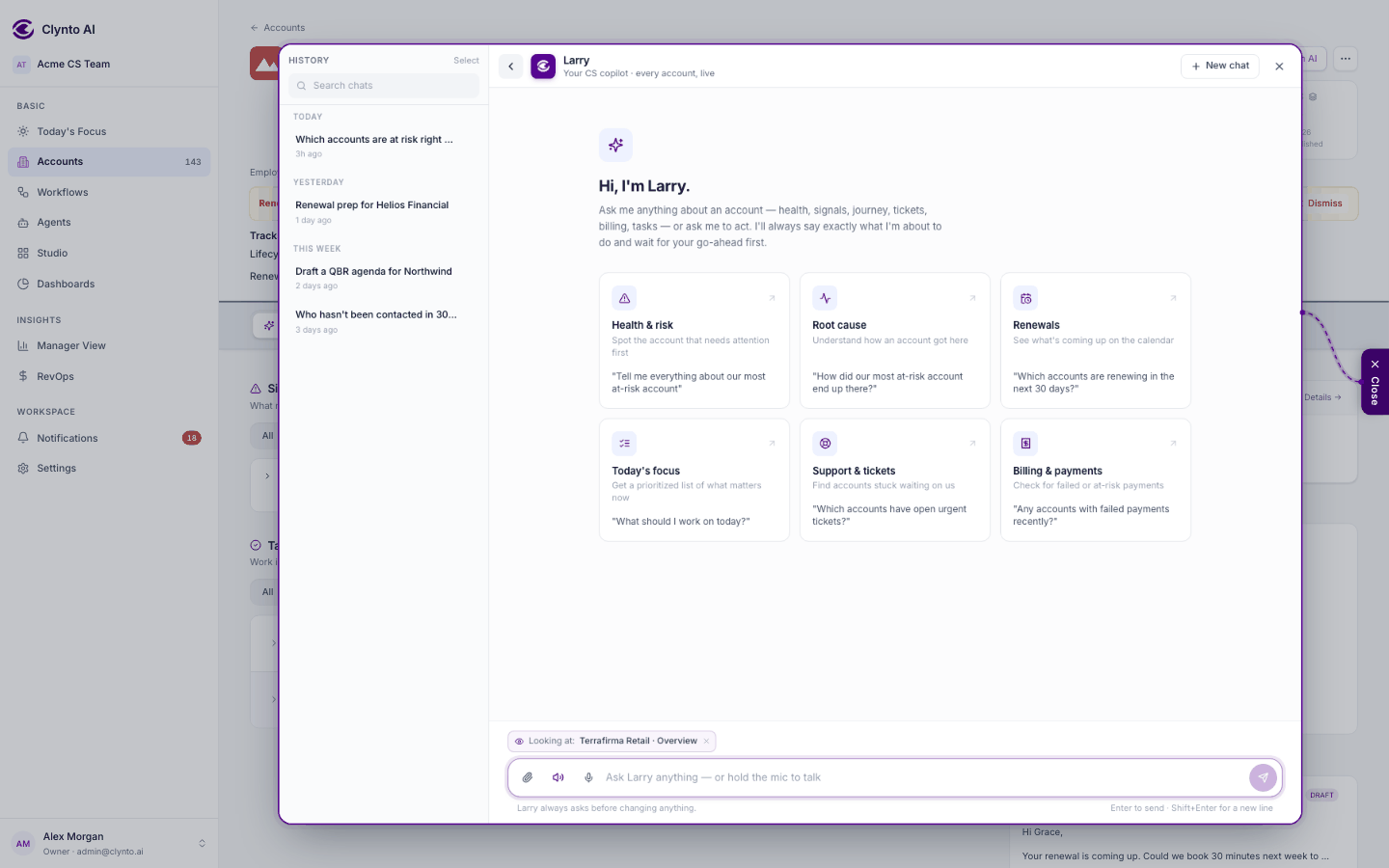
History — the rail on the left of the panel (open by default on wide screens; toggle it from the header) lists your past chats grouped by date. Search them, reopen one, or select several and delete them.
"Looking at" — a chip above the message box shows the page you're on, and the account, workflow, campaign or business report when there is one. With it on, "this account", "here" and "this page" mean what's on screen. Remove the chip to leave the page out of your next message only. Larry checks you can see the record before using it.
Copy and Ask again — under each answer. Ask again re-runs the same question and replaces the answer; the earlier versions are kept and you can page back through them with the arrows. An answer that already made a change can't be asked again (that could repeat the change), and a pending change from the old answer is dropped, so the new answer has to show it to you again.
What Larry can read
Accounts and their full detail, journey tracks and history, signals, tasks, tickets and their threads, workflows, agents, Today's Focus, the approvals queue, Stripe subscriptions and invoices, campaigns and their results, reports, usage and each account's credits pace (allowance, used vs expected, run-out date, allowance history), integration status, health rules, Larry Time questions, and each account's documents. Answers come back immediately.
What Larry can change
Create and close tasks, raise or dismiss signals, draft emails, reply to tickets, set an account's status, set any of the five journey tracks (Expansion & Opportunity included), edit account fields and dates, set an account's usage allowance (credits per period, or Unlimited), reassign a CSM, run an agent or a workflow, build a workflow from a description (naming accounts — "for Northwind Systems" — limits it to them), manage campaigns and templates, recompute accounts, wake background workers — and much more.
When you ask to change a track, Larry shows the valid states as buttons; click one and Larry previews the change. A track state set through Larry is held for 14 days, like a CSV import (Risk & Health is never held — it follows the score).
Changing many accounts at once
Ask for a bulk change — "set Expansion to Identified for all my Usage-Led accounts", "give every account without an allowance 10,000 credits a month" — and Larry picks the accounts by name or by the same filters as its account lists. The preview shows how many accounts and which ones; nothing changes until you confirm. Up to 500 accounts at a time. Lost accounts, and accounts already in that state, are skipped. Bulk changes can set a track state, set status back to Active, assign a CSM, set profile, renewal date or seats, or set the allowance; marking accounts Lost in bulk isn't offered.
Note
Every change takes two turns. The first time Larry calls a write, it only describes exactly what would change. Nothing is written until you confirm in your next message. This is enforced by the server, not just by Larry's instructions.
Larry follows your permissions
Larry works as you. Financials need RevOps access, the team view needs team-performance access, the audit log needs audit access. Larry is never a way around permissions. On a Lost account every write is refused except setting it back to Active.
You can check its work
A strip under each answer lists the tools Larry actually used, so you can trace any number back to its source. When a name is ambiguous, Larry asks which account you mean instead of guessing.
More ways to ask
- Attach a file with the paperclip to ask about it in the conversation.
- Voice: hold the mic in the message box to talk. Larry answers in text; turn on the speaker icon beside the box to have replies read out loud (it's off until you turn it on, and remembered in this browser). Turning it off stops Larry mid-sentence and cancels a recording.
Long conversations
Larry keeps as much of the recent conversation as it can word for word, and folds older turns into conversation notes: your goal, the filters and preferences you stated, decisions made, the files and records in play, and open questions. So in a long chat it still knows that "those accounts" are the ones you filtered an hour ago. Only what you said can set a goal or a rule; text in a file or a tool result never does. Numbers are always looked up again rather than taken from memory. Starting a New chat for a new topic still gives the cleanest answers.
Every Larry action is scoped to your workspace and audit-logged, and its tokens count in Settings → Billing → Usage, which also shows how many of them were cached (cheaper repeats of the same instructions).
Built to be quick and cheap
Larry keeps its instructions short and identical from turn to turn so they can be cached, carries a core set of about 30 tools and looks up the rest only when a question needs them, replays as many recent turns as fit a fixed budget (older ones become conversation notes, written in the background by a smaller model), keeps every request under a size cap, sends the model at most 25 rows of any list (you still see every row), and runs independent lookups at the same time.