
Signals and Tasks
Last updated on
Signals
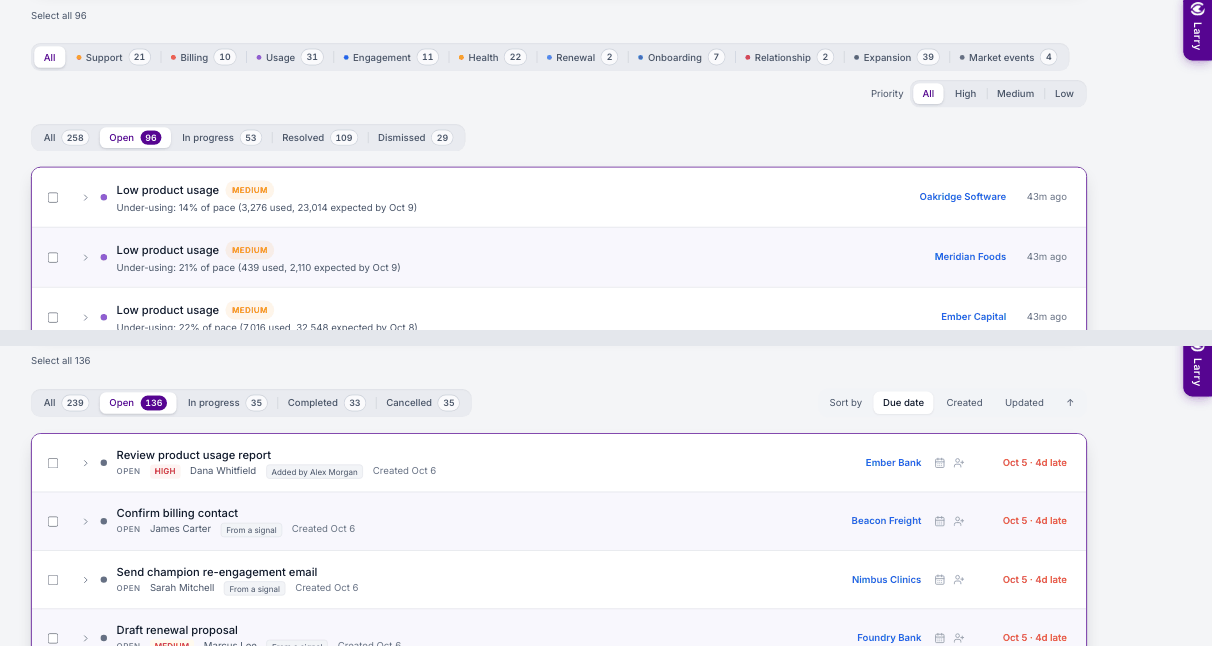
- Categories — chips across the top are built from the signal types actually raised in your workspace (Support, Billing, Usage, Engagement, Health, Renewal, Onboarding, Relationship, Expansion, Workflow & imported), each with its open count. All shows everything.
- Priority — High, Medium or Low, on the right.
- Status — All · Open · In progress · Resolved · Dismissed with counts; Open is the default. Dismissed shows who dismissed what, and why, with Restore.
- Expand a signal for its evidence and three AI next steps; turn any step into a task. Its tasks are listed inside it; click one to open the task popup.
- Bulk dismiss — tick rows, or Select all, then Dismiss (needs
signals.dismiss).
Tasks
- All, Open (default), In progress, Completed and Cancelled tabs, each with its own count; sort by due date, created or updated.
- New task, and Run Task Closer AI to close tasks that are already done.
- Expand a task to change its status, Cancel task, change Assigned to and add notes, or Open task for the full view.
- Bulk delete — tick rows, or Select all, then Delete (needs
tasks.delete; admins and managers by default).