
The dashboards
Last updated on
Dashboards has a tab for each view: Overview, Signals, Tasks, Customer 360, Renewals, Risk, Onboarding, Usage, Scheduler and All tickets. (Business Reports now live under Studio in the left navigation. The old Adoption page was removed — product usage is on Usage — and old links to it land on Overview.)
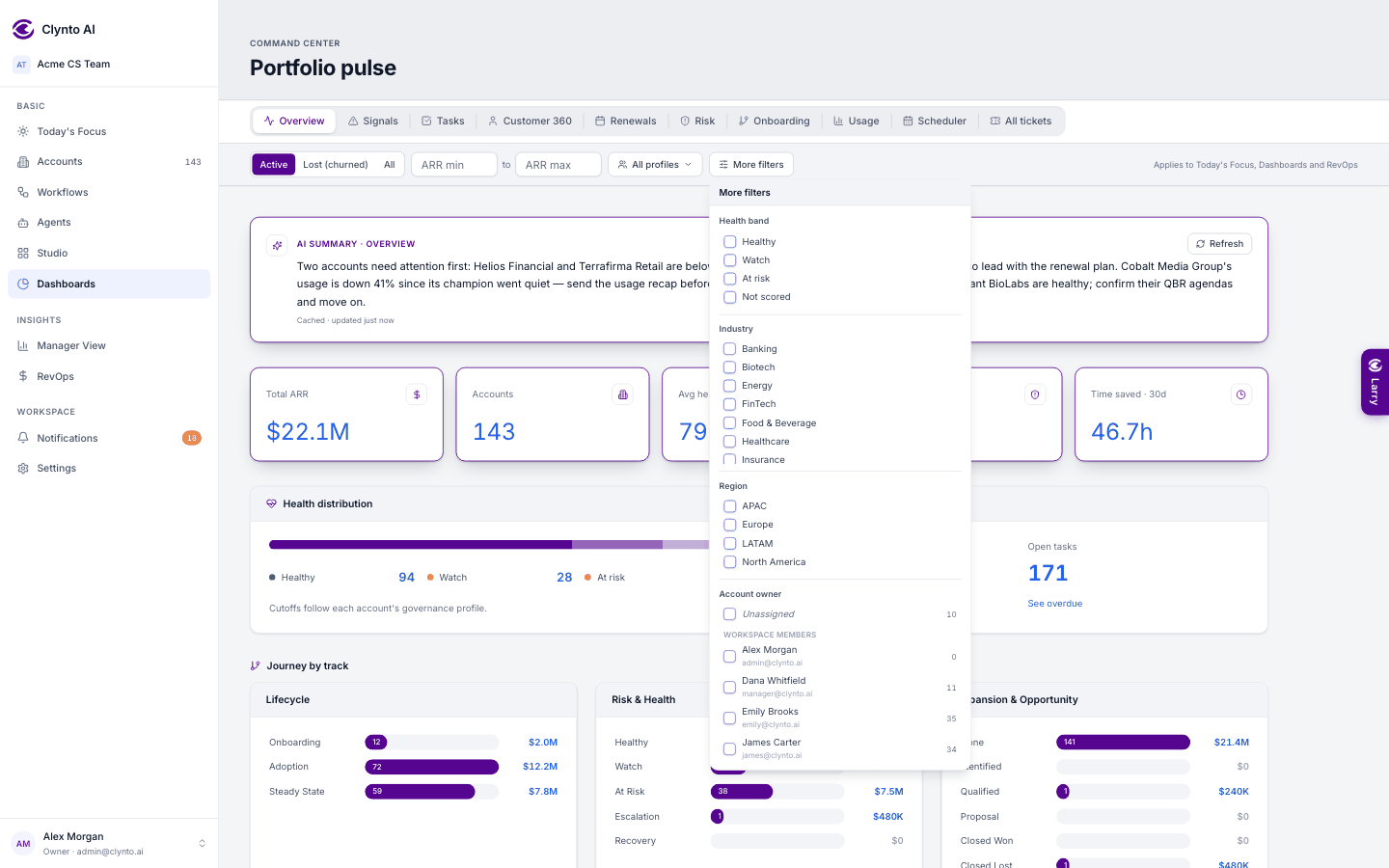
The filter bar
One portfolio filter narrows every dashboard and stays with you as you move between them: status, ARR range and profiles up front, and More filters for health band, industry, region, renewal date, each journey track, health score, seats, employees and Details-tab fields. Account owner is grouped so nobody is mistaken for a teammate: Unassigned, Workspace members (name and email), and Not a member (from imports) for owner emails that arrived by CSV or CRM sync but match no member. Each option shows how many accounts it covers.
Ranges are checked everywhere. If a minimum is bigger than its maximum (ARR 500000 to 1000, a health score of 80 to 20, a "from" date after the "to" date), the boxes turn red, a short note says it is not applied, and a Swap button flips the two values. This works the same in the filter bar, More filters, Usage and Renewals/Risk date ranges, All tickets, Manager View, Notifications, the audit log, Business Reports custom dates, Slack alert ARR limits and a campaign's "is between" condition.
The AI summary
A short paragraph at the top of Overview, Signals, Tasks, Renewals, Risk, Onboarding and Reports sums up what the page shows for your current filters. It is written in the background and cached, so the page never waits for it; Refresh writes a new one while the old text stays on screen, and the card says when it was last updated.
Numbers you can click
The KPI cards (white with an indigo border) and every count on the page are drill-downs. Click one to open a popup listing exactly the accounts, signals or tasks behind it, paginated, keeping your filters, with each name linking to the account.
| Dashboard | What it shows |
|---|---|
| Overview | Total ARR, Accounts, Avg health, At risk and Time saved (30 days); the open-signals and tasks queue; Agent actions (everything agents did on their own in workflows, with what and why, filterable by agent and workflow); signals by severity; renewals in 30/60/90 days; health spread; sync health; top at-risk accounts; and Workflow notifications — the newest Notify-step messages on the accounts in your filter. |
| Signals | Every open signal, grouped by type, with priority, bulk dismiss and the Dismissed view. |
| Tasks | Open, In progress and Completed tabs, bulk delete and the Task Closer. |
| Customer 360 | One account at a time, everything on a single screen. |
| Renewals / Risk | Accounts renewing, or at risk, inside a time window. |
| Onboarding | Accounts still getting live, by milestone. |
| Usage | Product usage per account, and per contact. |
| Scheduler | Your CS calendar: meetings, renewals and task due dates. |
| All tickets | Every ticket across your accounts. |