
The Accounts list
Last updated on
The list is built for scanning quickly and acting in bulk.
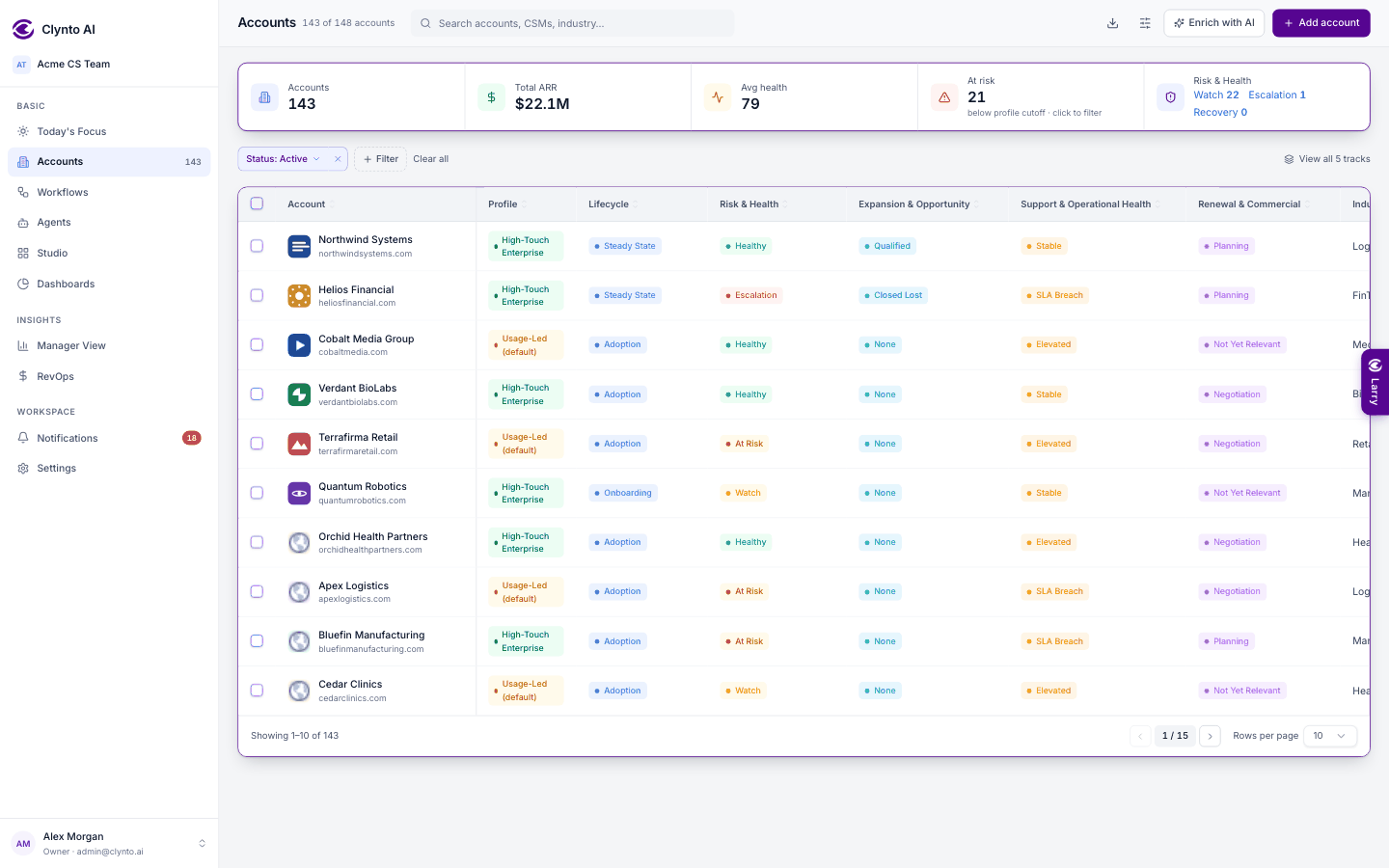
- Summary cards across the top — Accounts, Total ARR, Avg health, At risk (click it to filter to those accounts) and Risk & Health with links for Watch, Escalation and Recovery (each count filters to that state; click again to clear) — follow your filters.
- The count in the header reads "12 of 340 accounts" when filters are on. The sidebar's Accounts badge shows the same number while you're on this page, and your Active accounts everywhere else. The list loads at most 500 accounts; in a bigger workspace the header says "first 500 of N loaded" — narrow it with search or filters.
- Search finds accounts, CSMs or an industry. Filter adds a chip per condition (status, profile, each journey track, Usage set-up — no usage allowance or no subscription start date — and more); Clear all removes them.
- Columns by default: Account (logo and domain), Profile, one column per journey track (Lifecycle, Risk & Health, Expansion & Opportunity, Support & Operational Health, Renewal & Commercial), Industry, ARR, Health, CSM, Renewal and Data source. View all 5 tracks explains what each track's states mean.
- Status is exactly Active or Lost. The default view shows Active accounts; switch the filter to find Lost ones. Lost rows carry a Churned tag beside the name.
- Sort by clicking a column header.
- Rearrange columns by dragging the grip at the left of a header (or a row in Edit columns) and dropping it where you want it; the Account column stays pinned.
- Edit columns (the sliders icon) chooses which of the optional fields appear — sub-industry, region, contract value, sales owner, seats, renewal probability, start date, domains, HQ, created date and more.
- Pagination: 10, 30, 50 or 100 rows per page.
- Export (the download icon) downloads exactly the columns you can see, in the current filter and sort order.
Bulk actions
Tick rows to reassign the CSM, set a profile, set the status, enrich with AI or delete. Each bulk action needs the same permission as doing it one account at a time.
Reading a row
- The first column is pinned, so the name stays put as you scroll right. Drag any column edge to resize it; widths are remembered per user (Edit columns → Reset widths puts them back).
- Health is a ring that fills with the score, coloured Healthy / Watch / At risk by the account's own profile cutoffs.
- The CSM shows with their avatar.