
The account page and its tabs
Last updated on
Open any account to see everything about it on one page.
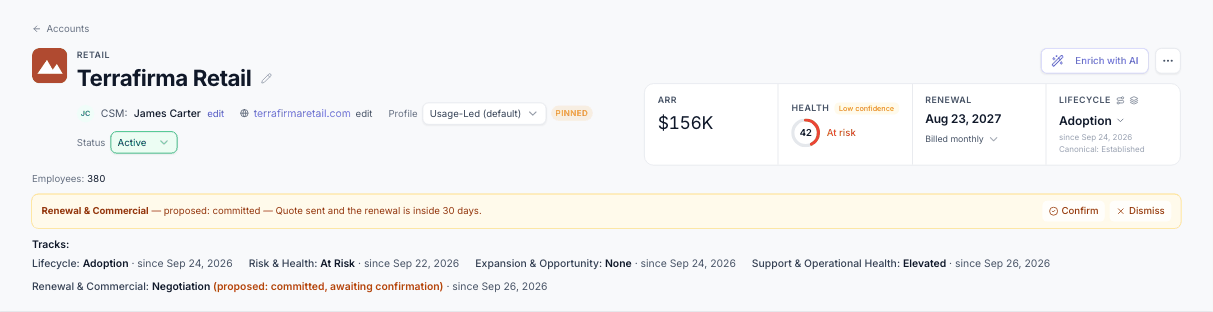
The header
- Name and logo, with a pencil to rename (Owner or Manager) and a "via CSV import / HubSpot…" tag showing where the account came from.
- One row of details: the CSM (pick from your members), domains, Profile (or Auto (by ARR)) and Status (Active / Lost). A Lost account shows the Churned badge with the date.
- Journey tracks under the details: one card per track (Lifecycle, Risk & Health, Expansion & Opportunity, Support & Operational Health, Renewal & Commercial) with the state as a coloured chip (green healthy, amber watch, orange at risk, red escalation, blue recovery), a strip showing where it sits in the track's ladder (Lifecycle a progress bar, Renewal numbered steps), "since <date>", a Proposed: X · awaiting confirmation badge and the hold date when the track is held. Click a card for the whole ladder (set the state there), Confirm / Dismiss a proposal, Recompute tracks, Track history and How tracks work.
- Enrich with AI fills in company details from the website; More (⋯) holds Delete account, out of the way.
- Four key numbers: ARR; Health — click the ring for the popover: why the score is what it is, the profile's cutoffs, open signals, which data sources fed it, components left out of the score, and Pin score / Recompute now (the score and Risk & Health); Renewal, with the billing frequency beneath it; and Lifecycle, the journey stage picker with View all 5 tracks.
- Recompute tracks, in the same health pop-up, recomputes all five journey tracks for this account now, showing any held tracks with Release hold & recompute (see the Journey chapter). Track changes waiting for a person's confirmation show as amber rows below the key numbers, with Confirm and Dismiss.
The tabs
The header and the tabs stay at the top as you scroll; only what is below the dark line moves. Scroll down and the header shrinks to a compact bar — name, Status, CSM, ARR, Health, Renewal, Lifecycle and the Tracks line (with Confirm / Dismiss) — and every control there still works. Scroll back to the top for the full header.
The tabs sit in one rounded bar. Contacts, Documents, Agent Runs and Tickets show their count beside the name (for example Tickets 23) — the counts come with the page, no extra wait. Overview starts with Signals and Tasks; Contacts, Usage and Billing open with headline tiles.
| Tab | What you'll find |
|---|---|
| Overview | Four tiles (signals needing action, open tasks, days to renewal, contacts and champions), then health, open signals with AI next steps, Workflow notifications (what this account's workflows' Notify steps said, newest first, with Mark read), Workflows for this account (workflows limited to it), the top 5 tasks (the same row as the Tasks dashboard — status, priority, assignee, due/late, source, created date, notes, files, Ask AI, Reschedule and Delegate — with View all N in a popup), Key people, and the Email drafts card below it: open drafts with To/Cc/Bcc, where they came from ("From task: …" links to the task) and who made them. Click a draft to open the full editor in a popup — To, Cc, Bcc (your default Cc/Bcc already filled in), Subject, the whole message, Rewrite with AI (Regenerate, Shorter, More formal, Friendlier, with Undo), Save and Send. Send really sends it from your own Gmail/Outlook and is recorded as sent only once your mailbox accepts it; if it refuses, nothing is sent, the draft stays here and the conversation says Failed to send. Or discard it. A draft saved from a task's Ask AI shows up here straight away. |
| Details | The account's own fields grouped as Company, Commercial (including the Usage allowance, its period and Unlimited), Ownership and Dates, then every custom field from imports, grouped by type. Every field edits the same way: hover it, click the pencil, press Enter or click away to save, Esc to cancel. Pick-lists save as soon as you pick, and the header updates too. A lock marks a field you can't edit here; hover it for the reason (for example the health score is worked out by the health rules: pin it from Health in the header). View only members see no pencils, and a Lost account is read-only except its Status. |
| Contacts | People at the account as cards with avatars and role chips, 12 per page, with search and a role filter; roles, emails, LinkedIn, tags (the same 7 everywhere: champion, decision maker, economic buyer, influencer, technical contact, billing, power user), "Seen X ago" and enrichment. (Utilization score and Sessions were removed.) |
| Usage | Credits & pace first: the allowance per period (set it or remove a hand-set value here); without a hand-set value the most recent change from the Usage API, HubSpot or a CSV import wins, used so far against what was expected by today, the status (Under-using, On track, Ahead of pace, Will run out early, Over allowance), the projected run-out date, a chart of the period and the Allowance history. "No usage data" always says why (no source connected, not matched yet, nothing synced). Then product usage from Mixpanel by day and by user, and API usage: a per-day bar chart of the primary field split by breakdown, and a heatmap with one cell per day (darker = more), the field column and dates pinned while it scrolls sideways, month lines, a pinned Total, breakdown rows indented in a lighter tint, and the exact value on hover. |
| Documents | Contracts and files (up to 50 MB each, PowerPoint included). Larry reads each upload into memory (see "Larry's document memory"). A PDF changed by Larry or in Analyse files is saved as a new version (v2, v3 …) with the earlier versions folded under it. |
| Agent Runs | What each agent did on this account and when. |
| Tickets | Support tickets from Freshdesk, inbound email and sent reports. |
| Billing | Current plan, ARR, collected and outstanding tiles, a collected-vs-unpaid chart for the last 12 months, the subscription, and Stripe invoices by month with Paid / Open / Failed chips. |
| History | One timeline of everything that happened to the account. |
Tip
Fields named like credits, limits or quotas show as plain numbers, not money — an "annual credit" of 1,200 is an allowance, not $1,200.