
Credits allowance and pace
Last updated on
Usage is judged against what each customer actually bought. An account's allowance is the credits it gets per period — Weekly, Monthly, Quarterly or Yearly — or Unlimited. "Monthly 10,000" means 10,000 credits are granted each month.
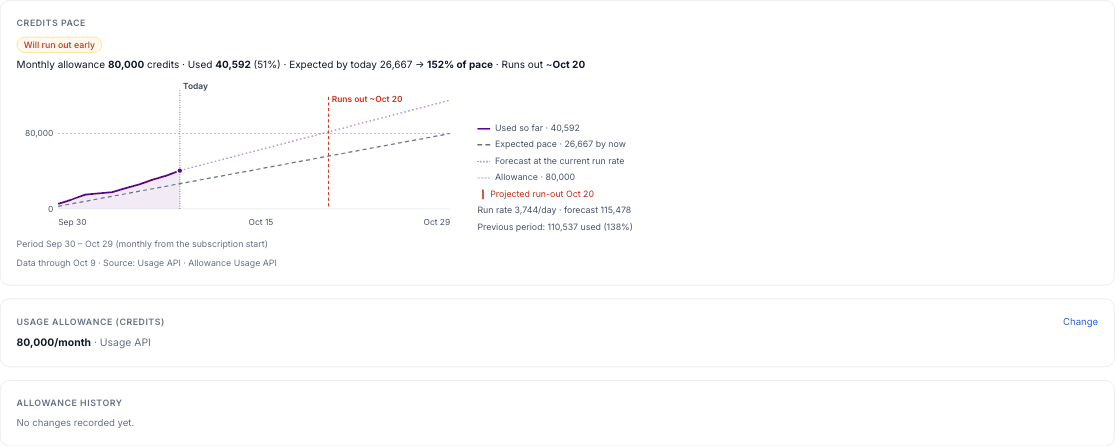
Periods start on the subscription start date
A monthly allowance resets on the same day each month as the subscription started (moved to the month's last day when that month is shorter); quarterly every 3 months; yearly on the anniversary; weekly every 7 days. The start date is the one you supplied (CSV "Subscription start date" or the account's Start date); the Stripe subscription's start is used only when you gave none. There is no calendar-month fallback: without a start date the account isn't judged on usage.
Pace
Pace = credits used so far this period ÷ credits it should have used by today (the allowance spread evenly over the period). Days with no data yet are never counted as zero. If the allowance changed mid-period, each part of the period uses its own allowance.
| Status | When (defaults) |
|---|---|
| Under-using | Pace below 50% — raises Low product usage |
| On track | 50% to 96% |
| Ahead of pace | Above 96% |
| Will run out early | At the average of the last 14 days with data, the allowance runs out before the period ends — raises Early credit exhaustion |
| Over allowance | More used than this period's allowance — raises Credits over allowance |
Each profile has its own Under-using and Ahead-of-pace lines (Settings → Health rules, on every profile, built-ins included). Data more than 3 days old is marked stale: it is never read as zero and doesn't raise Under-using.
Running out is good news
Early credit exhaustion and Credits over allowance never cost health points and move the Expansion track to Identified. Each creates a task for the CSM (source "Clynto · Usage monitor") with the numbers as evidence. The task starts with Expansion opportunity once pace is past 100%, and with Credit refill while pace is 100% or less; the title switches if pace crosses 100%. When it's raised: Over allowance straight away; Early credit exhaustion only once the projected run-out is close — within 45 days for a Credit refill, within 20 days for an Expansion opportunity (both set per profile in Settings → Health rules). An open one whose run-out moves further out, or whose pace crosses 100% into the shorter window, is closed with a notification ("Run-out is more than N days away … Clynto will raise it again N days before") and raised again when it's back inside; a signal you dismissed stays dismissed for that period. When the condition clears — the allowance is raised, usage settles, or the next period starts — Clynto resolves the signal and closes the task itself, and tells the CSM why.
Where the allowance comes from
There is no workspace default: an account with no allowance has no pace. Set it on the account (Usage → Credits & pace), ask Larry (one account or many), map it from the Usage API or HubSpot, or import it with an account or contact CSV. A value set by hand or through Larry wins until you click Remove hand-set value; after that the Usage API wins over HubSpot and CSV, and within one source the newest value wins. Every change is kept in the account's Allowance history; a change that arrives from an integration or a CSV also notifies the CSM.
Tip
Settings → Health rules shows how many active accounts can't be scored on usage (no allowance, no start date), with a link to the Accounts list filtered by Usage set-up.