
Signals: what they are and where they come from
Last updated on
A signal is a specific thing flagged on an account for a person to look at — an SLA breach, a failed payment, low product usage, a champion who left. Each has a type and a severity (high, medium or low).
On Dashboards → Signals they are grouped by what was actually raised, worked out from the type: Support, Billing, Usage, Engagement, Health, Renewal, Onboarding, Relationship, Expansion, Market events, and Workflow & imported for signals a workflow or a CSV created. Only the groups your workspace has signals in are shown, each with its open count.
From integrations
Every signal a sync writes is tied to the record behind it (a Freshdesk ticket, a Stripe invoice, a usage reading). On each sync:
- If the condition still holds, the existing signal is refreshed — you never see duplicates of the same issue.
- If the condition has cleared (ticket closed, invoice paid, usage recovered), the signal is resolved automatically.
From agents and workflows
Agents raise signals when they spot a problem — but only when they run, which means inside a live workflow (or when you run them by hand):
- Health drop — raised by the Health Signal Detector, which is now the first step of the Health Risk workflow ("Do automatically"). The score is below 60 for 2 daily readings in a row, or fell 15+ points in 14 days, or dropped into the profile's at-risk band. It clears only 5 points above the line. (If you had edited your Health Risk workflow, the step wasn't added for you.)
- Renewal risk — inside the 60-day renewal window, a risk score from several factors (low health 30, usage down 20, champion loss 25, payment problems 20, escalations 15, angry messages 15) reaches 50; it holds until below 40. Health below 60 in the window still raises it on its own.
- Onboarding stalled — per-stage limits: kickoff 7, integration 21, first value 30, go-live 14 days; no first value after 45 days. The blocker is named from emails and tickets.
- Champion loss — hard evidence first (a bounce, a "no longer with the company" reply, a CRM change, news), then silence longer than 3 × the champion's usual gap (at least 21 days). Successors are suggested.
- Low product usage (from syncs) — the account's credits pace is below its profile's Under-using line (default 50% of the expected use by today), judged once enough days of the period have data. From Mixpanel it also fires on low active users, or active users 40%+ below the account's own 30-day baseline (clears under a 30% drop).
- Early credit exhaustion and Credits over allowance (good news) — see "Credits allowance and pace" below.
- Market event — public news (funding, layoffs, leadership change, M&A) from the Market Intelligence Scanner, if you turn it on in Settings → Integrations. One event is one signal however many outlets cover it; the other articles are listed under "Also reported by" in its Evidence. Funding is positive and never lowers health.
- Cancellation intent — Inbound Auto-Reply read a customer email asking to cancel. It stays open until a person closes it.
- Expansion intent (good news) — raised by the Expansion Opportunity Finder on a healthy account: high when 100%+ of seats or volume is used or a plan limit was hit, medium at 85%+ or when usage is growing, low for new teams or domains. It adds the small expansion bonus to health (never lowers it), closes 14 days after the Finder stops seeing it, and is never added next to one a person already flagged.
Your Signal rules decide which signal types may fire for each profile (see "Signal rules" below).
Flag a risk (from a person)
Heard something on a call? Use Flag a risk in Today's Focus quick actions. Pick a real type (for example Champion loss or Cancellation intent) and add a note. It behaves like that type: it counts toward health and starts that type's workflows within 15 minutes. Clynto never closes a flagged signal on its own. An account keeps one open signal per type, so if one is already open you're offered Add my note to it.
Working with a signal
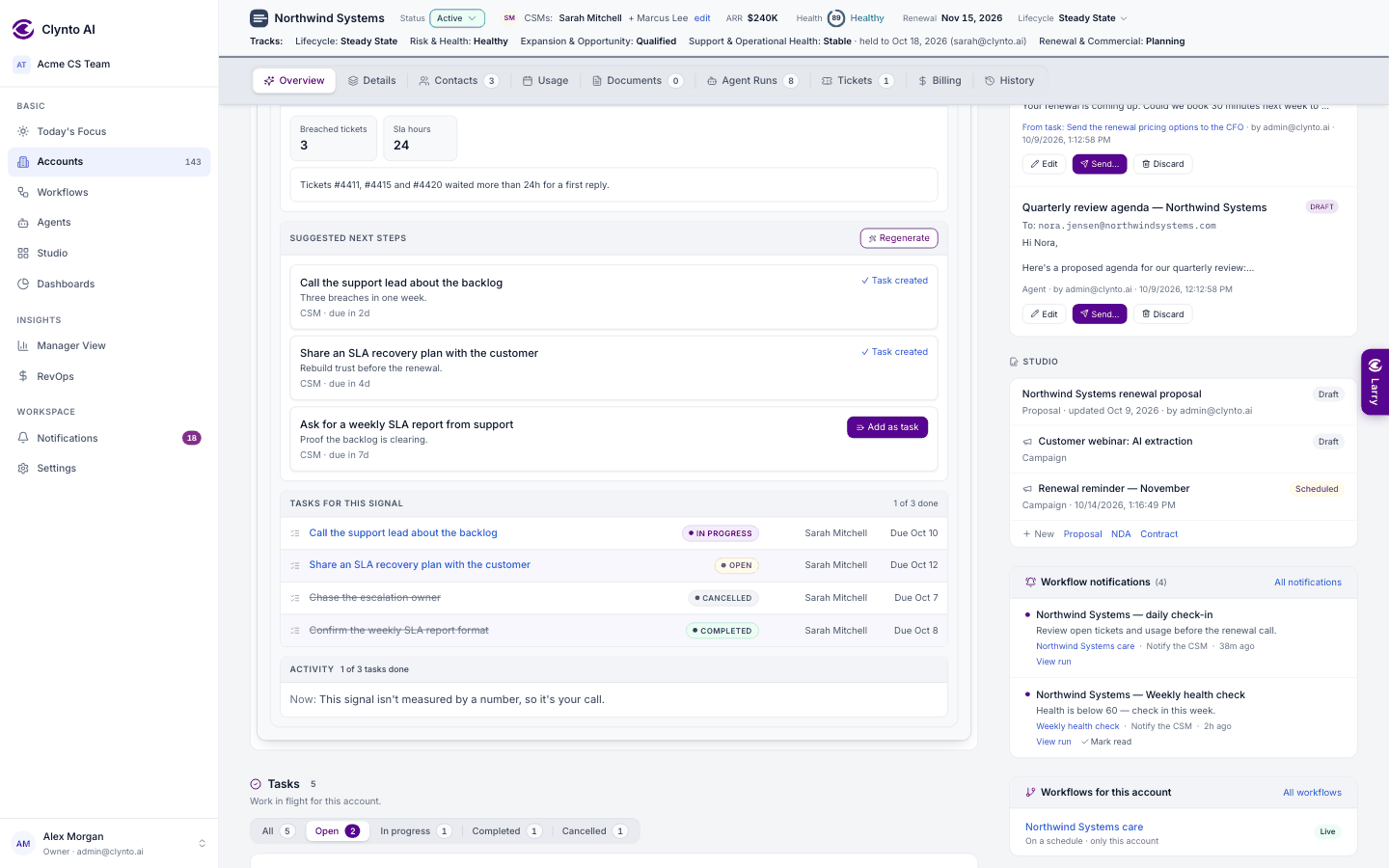
Expand a signal on the account or on Dashboards → Signals to see its evidence and three AI next steps, each with a reason, an owner and a due date. Turn any of them into a task with one click. The steps are saved on the signal, so reopening it doesn't cost another model call; Regenerate asks again.
A signal's status follows its tasks
| Status | Chip | When |
|---|---|---|
| Open | amber | raised, nobody working it yet (acknowledged counts here too) |
| In progress | indigo | a task was created for it (Add as task, Larry, a workflow or agent, the usage monitor) |
| Resolved | green | all its tasks are done ("All linked tasks completed"), the numbers recovered, or a person resolved it |
| Dismissed | grey | judged wrong; its open tasks are cancelled with it (Undo restores them) |
| Snoozed | indigo | put away until a date the customer promised; off your lists and the health score; closes itself if the problem clears first, and wakes the day after the date if not |
In progress still counts as an open problem for health and detection. On the account Overview and the dashboards, filter signals by All · Open · In progress · Resolved · Snoozed · Dismissed and tasks by All · Open · In progress · Completed · Cancelled, each with a count; both start on Open. Signal lists alternate white and a light indigo tint so neighbouring signals never merge.
Tasks inside a signal
Once tasks are generated or added from a signal, the signal shows them under Tasks for this signal: title, status chip, assignee and due date (and a small "N tasks" chip on the collapsed row). Click a task to open it in the task popup — change its status, Assigned to, notes, Ask AI, email, complete it or Cancel task — without leaving the signal.
Cancel task
Cancel task closes a task without doing it (status Cancelled, grey, never overdue). Tasks cancelled because their signal was dismissed use the same status (it used to be called "Dismissed"). In a task, Assigned to is a people picker; notes show compactly (newest first, two lines each, Show more), and earlier Ask AI questions show as short two-line summaries.
When the work is done: signal follow-through
When the last task raised for a signal is completed, the signal is resolved straight away ("All linked tasks completed"), with a History entry and a notification; cancelled tasks don't count, but at least one task must be done — so cancelling the last open task next to a completed one resolves it too. Before this rule, Clynto asked instead: "All N tasks raised for <signal> on <account> are completed", and shows the number before → now against the rule (for example health 52 → 68, clears at 65+). One task can settle several signals: tick them in the Signals field when you create the task, or in Signals this task works on on its details while it is open. Finishing it resolves each linked signal once all of its tasks are done.
| Where it stands | Your choices |
|---|---|
| Recovered | Resolve signal / Keep watching |
| Not recovered yet | Keep watching (stays open, closes itself when the numbers recover) / Mark as handled / Dismiss |
| No number to check | Mark as handled / Dismiss / Keep open |
A result screen confirms it. Everything is recorded in the account's History and in the signal's details, where Review outcome shows it again (for a signal that is still open).